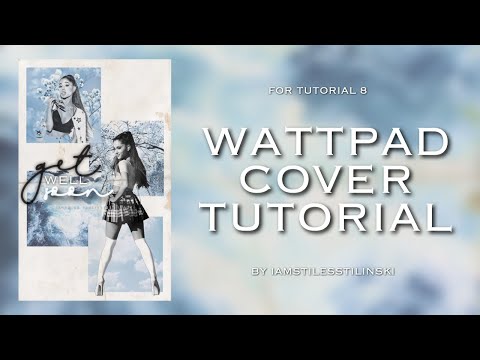
Note: The cover here will look slightly different than the one in the YouTube video. Very slightly. It's cause I got lazy to make sure they were exactly the same but I tried my best
Resources needed: 1. 4 aesthetically similar images (square) 2. 2 pngs of faceclaim including one of their full body 3. White background (Wattpad cover size; 1536x2400)
Apps needed: 1. Phonto 2. PicsArt
1. Find 4 pictures with a similar aesthetic. In my case, I went with a muted blue colour. Make sure all the pictures compliment each other and crop them into squares. You're also going to want to find two pngs of your faceclaim. One should be a full body pic.
2. Open a plain white background of Wattpad cover size in Phonto and place the four pictures on it like this:
Oops! This image does not follow our content guidelines. To continue publishing, please remove it or upload a different image.
Save.
3. Head over to PicsArt. Here you're going to add the PNGs of your faceclaim. You can put one in one of the squares and then the other one like this:
Oops! This image does not follow our content guidelines. To continue publishing, please remove it or upload a different image.
4. Add texture to your picture. In PicsArt, open Effects > Paper. Here there are a variety of textures you can pick from. I picked 'Stenciler 2', changed the colour to white and blended it in with Darken.
5. Add a lighting and grain texture to the cover. You then want to add effects/adjust the picture. I did this in PicsArt by using the 'Sharpen' and 'Drama' (Darken) effects. Save.
Oops! This image does not follow our content guidelines. To continue publishing, please remove it or upload a different image.
6. Last, but not least, head back to Phonto and add your text. For this cover, I used the following fonts: • Dream Only • Futurist Fixed • Copperplate Light
Oops! This image does not follow our content guidelines. To continue publishing, please remove it or upload a different image.
I added shadows and reduced opacity for all of them to add a little dimension to them.
Oops! This image does not follow our content guidelines. To continue publishing, please remove it or upload a different image.
Save.
And then, you are done!
I hope you enjoyed this tutorial. If you need any help, you can leave a comment and I'll be sure to reply as soon as possible.